

Robot Lawn Mowers and Husqvarna Automower: A Practical Buying Guide
First published in 2016. Substantially expanded in October 2026 using current manufacturer documentation and horticultural, wildlife and security guidance. Garden Gadget Zone has not physically tested the mowers described.
A robot mower is most useful when the lawn, navigation system and available mowing hours fit together. Buying by lawn area alone misses the awkward parts: a shaded passage, a steep boundary, a separate front lawn, children’s play equipment or a charging station that cannot be reached reliably.
Modern machines range from boundary-wire mowers to systems combining satellite positioning, cameras or laser-based mapping. Wire-free installation can make boundary changes easier, but it does not remove the need to survey the garden, configure safe working areas and maintain the machine. The right question is which system can work reliably on your particular lawn.
This established page began with the Husqvarna Automower 315. It now covers the wider buying decision while retaining a dedicated original-315 buying section. The original 315, newer Automower generations and other navigation systems are not interchangeable.
What a robot mower actually does
Most domestic robot mowers maintain grass by cutting small amounts frequently and leaving fine clippings on the lawn. They return to a charging station between working periods. They are not generally a substitute for clearing an overgrown plot, collecting fallen branches or making a single heavy cut after weeks of unchecked growth.
Allow for the jobs that remain: clearing toys and debris, trimming inaccessible edges, checking blades and wheels, changing schedules with the season and dealing with occasional stoppages. A garden with many disconnected patches may require more handling than the owner expects. Automation reduces a routine task; it does not remove responsibility for the working area.
Survey the garden before comparing models
- Measure the grass to be cut: exclude the house, beds, paths and areas deliberately left long. Record separate lawns individually.
- Mark hazards: ponds, drops, roads, open gates, roots, holes, loose edging, cables and places where the mower could leave the property.
- Measure slopes and passages: include narrow entrances to larger areas, changes in level and turns at the bottom of slopes.
- Assess signals and surroundings: note buildings, dense tree cover, tall hedges, Wi-Fi coverage and possible antenna positions.
- Plan a daily operating window: leave time for people, pets, wildlife, charging and unsuitable weather.
- Identify a suitable dock position: check power provision, approach clearance, drainage and the model’s navigation requirements.
For a difficult site, ask a competent installer to assess the proposed model on the actual lawn. A useful demonstration includes the worst passage and shaded corner, not just an unobstructed rectangle beside a showroom. Get the proposed limitations and extra equipment in writing.
Boundary wire versus wire-free navigation
Boundary-wire systems
A cable around the working area defines where a compatible mower may operate. Depending on the system, guide wires help with routes to remote areas or the charging station. The wire is a boundary signal, not necessarily a mowing track: the mower can cut within it using its own movement pattern.
Wire can suit a stable garden where satellite visibility is poor and a physical installation is acceptable. Its disadvantages are installation effort, breaks or connector faults, and the work involved in changing boundaries. Record the cable route before aerating, edging or digging. A cheap second-hand mower without its matching dock, power supply and installation components may be poor value.
Satellite positioning and RTK
GNSS is the broader term for satellite positioning; GPS is one satellite system. RTK uses correction information to improve positioning beyond ordinary consumer GPS. The corrections may come from a local reference station or a network service, depending on the mower. A product mentioning GPS might use it for theft tracking or navigation assistance rather than a wire-free boundary.
Check separately what the mower needs for satellite reception, correction data and app control. Buildings and trees can obstruct or reflect signals. Some systems combine satellite positioning with other sensors to bridge difficult areas, but the supported conditions and distances are model-specific. “No antenna in your garden” is not the same as “no satellite or network dependency”.
Vision, LiDAR and combined systems
Cameras can help identify grass edges, recognise obstacles or support navigation. LiDAR measures distances using light and can help build a map of the surroundings. Manufacturers combine these with wheel-motion and other sensors in different ways; the technology name does not establish the complete behaviour.
Ask how the system copes with a thin grass edge beside a bed, fallen leaves, changing light, dirty sensors and alterations to the garden. Determine what happens when confidence is lost: does it stop, request help or continue using a supported fallback? Check whether remapping is needed after moving the dock or making substantial changes.
Current examples illustrate different trade-offs
Husqvarna’s UK Automower 308V combines satellite navigation and vision. Its listing requires Wi-Fi coverage across the working area and says its vision technology requires daylight. It gives different capacity figures for systematic mowing (800m²) and irregular mowing (500m²). Those distinctions matter more than quoting a single maximum lawn size without its conditions.
WORX Landroid Vision Cloud combines RTK positioning with vision and uses a cloud-based correction network instead of a reference antenna installed at the property. Check the precise UK model, connectivity arrangements and service terms. This is a different generation from older boundary-wire Landroids; shared branding does not imply shared navigation or accessories.
Segway Navimow’s i2 LiDAR range illustrates a laser-and-vision approach that does not rely on satellite navigation. Regional models and capacities vary, so match the exact UK specification and installation instructions to your garden rather than transferring a figure from an overseas listing.
These are examples of documented approaches, not comparative test winners. Manufacturer statements about obstacle recognition, effortless setup or extreme accuracy are not proof that a particular lawn will work without intervention. Ask for evidence relevant to the obstacles and layout you actually have.
Capacity, mowing patterns and the hours available
The advertised area may assume a particular operating schedule, terrain and mowing mode. A mower capable of maintaining a stated area with long daily working hours may have less useful capacity when restricted to a short daytime slot. Allow headroom for spring growth, charging, wet days, complicated routes and periods when the garden is in use.
Systematic mowing usually follows planned parallel or otherwise organised paths. Irregular mowing changes direction through the area over repeated passes. Neither label guarantees a particular finish: coverage, turns, wheel marks, edge access and the ability to alternate direction all matter. A striped-looking mowing pattern is not necessarily the same as the rolled stripes from a conventional mower.
Do not combine the largest capacity figure from one mowing mode with the best runtime or slope claim from another without checking the conditions. Ask how long the whole garden takes to maintain within your intended schedule, including charging and travel between zones.
Slopes: percentages are not degrees
A 40% gradient means a rise of 40cm over 1m horizontally; it is approximately 22 degrees, not 40 degrees. Measure the steepest relevant section rather than judging it from a photograph. The maximum slope within the lawn can differ from the permitted gradient at a boundary, where the mower must turn safely.
The 308V listing, for example, specifies 40% inside the working area but 15% at the boundary. This is a model-specific distinction, not a rule for all mowers. Husqvarna’s slope-installation guidance explains why layout and model limits need to be considered together.
Wet grass, ruts and abrupt transitions can make traction harder even below a stated maximum gradient. Consider what lies below the slope. A pond, road or drop requires the physical protection and installation clearances specified by the manufacturer; a virtual boundary alone should not be treated as a safety barrier.
Narrow passages and multiple lawns
A mower fitting physically through a gap does not establish that it can navigate, turn or mow there. Boundary spacing, guide-wire placement, satellite visibility and approach angles may impose additional requirements. Use the installation manual for the exact model; Husqvarna’s passage guide illustrates how installation type changes the answer.
For multiple zones, establish whether the mower can travel automatically between them and return to charge. A secondary-area setting may still require carrying the mower. Steps, locked gates and public paths are not solved merely by an app supporting several zones. Do not create an unattended route across a public road or footway.
Check whether transport paths are mown, how temporary exclusions work, and what happens when a gate is closed. Keep a route available to the dock whenever the mower relies on it. If routine lifting is needed, consider the machine’s weight, safe carrying method and your own ability to manage it.
Cutting height, edges and lawn condition
Compare the available cutting-height range with the lawn you want to keep, not just its shortest setting. Some models adjust electronically; others need a manual adjustment. The RHS mowing guide recommends adapting cutting to growth and conditions, avoiding excessively severe cuts and taking care in wet or frosty conditions.
If grass is too long for the robot’s specified starting conditions, prepare it using appropriate equipment first. Raise the setting and reduce gradually as appropriate rather than expecting a small cutting disc to clear tall growth in one pass. During drought, review whether mowing is needed at all; do not keep cutting merely because a schedule is stored.
Expect some edging work. Offset blades or dedicated edge-cutting features can reduce the uncut strip in suitable installations, but walls, raised borders and required safety offsets still limit reach. An even, flush mowing edge can help where installation guidance permits it. Do not reduce a safety clearance to chase a few millimetres of grass.
Weather behaviour and watering
Rain resistance, a rain sensor, a forecast-based delay and a frost sensor are different features. Confirm what the exact mower detects and what it does in response. A weather-resistant machine may still churn up soft ground or leave a poor cut when the grass is wet.
Pause operation for waterlogged ground, ice or other unsuitable conditions, following the manual. Check whether app weather controls require an internet service and whether the mower resumes automatically. Keep the charging area out of flood-prone depressions and protect electrical equipment as instructed.
If the lawn has irrigation, arrange watering-controller schedules and mowing times so they do not conflict. Clear exposed hoses and temporary watering equipment from the working area. Do not assume obstacle recognition will protect a thin hose, low cable or sprinkler head.
Children, pets and wildlife
Obstacle detection, bump sensors and lift sensors are safeguards, not permission to operate among children or pets. Keep them out of the working area while the mower is running. Husqvarna’s safety guidance explicitly advises against operating when people, especially children, or pets are nearby.
Check the lawn before every scheduled session for toys, balls, stones, fallen branches, animal waste and wildlife. Remove hazards rather than relying on a camera to recognise them. Stop and isolate the mower according to its instructions before lifting it, reaching underneath or dealing with a blockage. Never let children ride on it.
The British Hedgehog Preservation Society advises checking before mowing and using robot mowers only in daylight. Hedgehogs can also be present during the day, so daylight scheduling reduces a risk rather than making operation harmless. Do not describe any mower as hedgehog-safe solely because its maker advertises AI or animal detection.
Keep unmown habitat outside the working area and use the required protection around hazards. Plan enough capacity to maintain the lawn without night mowing. A leaf-clearing tool may help manage seasonal debris, but inspect piles for wildlife and choose a rake or hand collection where that is more appropriate.
Connectivity, privacy and theft protection
Bluetooth, Wi-Fi and cellular connections serve different purposes. Bluetooth normally means being nearby; Wi-Fi requires coverage; cellular features depend on the relevant network and service. Establish what still works if the internet fails and whether mapping, remote control or navigation corrections depend on an ongoing account or subscription.
Satellite navigation does not automatically provide theft tracking. Check PIN protection, alarms, ownership binding, tracking hardware and any service charges individually. The 308V specification lists a geofence but no GPS theft tracking, illustrating why those labels should not be treated as interchangeable. Tracking also does not guarantee recovery or insurance cover.
For camera-equipped machines, read the privacy notice: where are images processed, are they retained or uploaded, who can access them, and what diagnostics are shared? Use the NCSC’s smart-device security guidance when setting up accounts and updates. Give access only to people who need it and use supported account-sharing controls.
Check the manufacturer’s stated security-support period before buying. UK connected-product security requirements include publication of minimum security-update periods for products within scope; this is not a promise of indefinite app or cloud-service support. For a used mower, confirm that the seller can legitimately transfer ownership and remove their account binding.
Installation and the first week
- Read the exact model’s installation manual before purchase. Identify required accessories, permitted dock locations, physical barriers and electrical arrangements.
- Prepare the lawn. Repair holes and loose edges, remove debris, and bring overlong grass within the recommended starting conditions.
- Install the boundary or map. Include safe exclusions, passages and routes back to the dock. Keep a record of a wire installation or the relevant app configuration.
- Observe initial runs from a safe position. Check every zone, difficult corner and return-to-charge route. Do not leave an unproven setup to run while you are away.
- Review stoppages and coverage. Correct the permitted installation settings rather than disabling safeguards. Ask the supplier about persistent navigation or traction problems.
- Set a conservative daytime schedule. Leave time for charging and garden use, then adjust to actual grass growth and performance.
A successful first run is only a start. Check the installation again after heavy rain, strong seasonal growth or a change to the garden. Before a holiday, arrange for someone to inspect the lawn and deal safely with a stopped mower; remote notifications cannot pick up a fallen branch.
Maintenance, batteries and ownership costs
Follow the manufacturer’s isolation procedure before maintenance. Inspect and replace blades and fixings as specified, using compatible parts and the stated replacement method. Sharp blades and clean wheels help performance, but intervals depend on use and conditions. Stop using a machine that develops abnormal vibration, damage or a charging fault.
Clean only by an approved method: a mower surviving rain does not automatically permit pressure washing or hosing underneath. Keep sensors and charging contacts in the condition the manual specifies. Follow model-specific winter storage and battery-care instructions; do not transfer a charging schedule from an unrelated battery system.
Ask whether battery replacement is an owner task or a service job, what an approved pack costs and whether it is available. Capacity and service life depend on use, age and conditions. A cordless-tool brand name does not establish that all its mower batteries are interchangeable.
Build a whole-ownership budget with separate lines for the mower, installation, required navigation accessories, electrical provision, blades, replacement battery, servicing, storage and any connectivity charges. Include a trimmer or other equipment needed for inaccessible edges. Compare written quotes on the same basis.
Electricity cost is measured energy in kWh multiplied by your tariff. Use a manufacturer’s clearly qualified consumption estimate or a suitable measurement, allowing for charging and standby. Do not multiply the motor’s rated power by every scheduled hour as if it ran continuously at that load. There is no single credible annual running-cost figure for every garden.
Buying an older Husqvarna Automower 315
Husqvarna marks the original 315 as discontinued on its UK support page. That does not establish whether a dealer has old stock or whether a particular used example is a good buy. Identify the article number and manufacturing year before comparing specifications: the original 315, 315X and 315 Mark II are different models.
Our historical listing named article number 967623405. The UK/Irish support entry for 967623403 states a nominal 1,500m² working area, with slope limits of 40% inside the installation and 15% at the boundary. Do not transfer regional specifications or supplied accessories between listings solely because both say “315”.
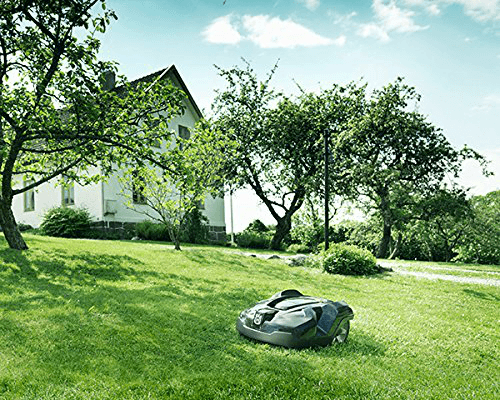
The original 315 uses boundary and guide wires; entering coordinates is not its installation procedure. Consult the 310/315/315X operator’s manual and select the edition matching your machine through its support page. Its cleaning, storage and maintenance instructions take precedence over methods advertised for a newer mower.
A useful second-hand inspection
- See it mow and dock: a photograph cannot establish battery condition or reliable charging. Ask for a working demonstration on an appropriate installation.
- Check the complete package: mower, matching station, power supply and installation materials. Obtain prices for missing components before agreeing a deal.
- Establish legitimate ownership: request purchase and service records and confirm that the seller can unlock and operate it. Arrange any account transfer through the manufacturer’s supported process.
- Demonstrate connectivity: nearby Bluetooth control is different from remote cellular access. Check fitted hardware and the matching documentation rather than assuming every 315 has the same app features.
- Check local repair support: give the dealer the exact article number and ask about an inspection, battery replacement and available parts.
Add installation, initial servicing, consumables and any connectivity costs to the purchase price. Compare that total with an itemised current-model quote for the same garden. If the seller cannot demonstrate the mower, its condition remains unknown; a low asking price does not resolve that uncertainty.
Current Automower context, including regional differences
The UK 405VE NERA is another current example, combining camera-based object detection and EPOS satellite positioning. Its UK listing gives 900m² for systematic mowing and 600m² for irregular mowing. Cloud installation requires suitable cellular or Wi-Fi coverage; a separate reference station provides an alternative arrangement. These features should not be attributed to an original 315.
US buyers should consult the local Automower 410 iQ listing rather than assuming a UK model name has the same specification. The current US page distinguishes 0.5 acre systematic capacity from 0.25 acre irregular capacity. Confirm package contents, navigation accessories, supported services, cutting height and local support for the exact regional model.
Our separate older WORX Landroid article remains a historical product reference, not a current comparative test. Manufacturer links on this page carry no affiliate tracking; no stock availability for the discontinued 315 is claimed.
When a robot mower is a poor fit
Think carefully before buying for fragmented lawns separated by steps, ground that remains rough or waterlogged, slopes or hazards outside the installation limits, or a space continually occupied by children and pets. It is also a poor substitute for a meadow-management regime that relies on allowing long growth and removing cut material.
If maintaining the area would require night operation, repeated carrying or unreliable network workarounds, choose a different model or retain conventional mowing. A small simple lawn may need too little work to justify the equipment, installation and support commitments. Accessibility benefits are real possibilities, but check the physical tasks that remain rather than assuming ownership is hands-free.
Buy only when you can explain how the mower will reach every intended area, return to charge, stay within safe boundaries and receive ongoing support. That garden-specific plan is more valuable than an unsupported “best robot mower” ranking.