Greenhouse Thermometers: Choosing and Using One
First published in 2015. Updated in October 2026. Based on horticultural guidance and manufacturer documentation; we have not physically tested the products below.
A greenhouse thermometer is most useful when it tells you what happened while you were away. A comfortable afternoon reading can hide a cold night or a much hotter spell at lunchtime. Recording the minimum and maximum helps you decide when to ventilate, shade or protect plants.
Start with a readable maximum/minimum thermometer and a routine for checking it. Add remote monitoring if seeing the temperature from the house, or receiving a warning while away, would let you take useful action. A thermometer measures conditions; it does not heat or cool the greenhouse.
Choose the kind of monitoring you need
- Analogue maximum/minimum: a non-electronic instrument can record extremes without batteries. Check that it really records both extremes, how its markers are read and how they are reset; a simple dial showing only the current temperature cannot do the same job.
- Digital maximum/minimum: useful for an easy-to-read display of current and recorded temperatures. Check battery type, display visibility, measuring range and whether the records survive a battery change.
- Wireless sensor with an indoor display: convenient for checking from the house. Confirm the sensor is suitable for the greenhouse environment and test reception in its actual position. Advertised open-air range does not establish reception through your particular walls and glazing.
- Connected monitoring: worthwhile if you need a temperature history or alerts. Establish which gateway, internet connection, app and power supply are required, what works during an outage, and whether any desired service costs extra.
A temperature-and-humidity sensor adds another measurement: relative humidity is not soil moisture. It can help you notice damp conditions, but it cannot decide whether a pot needs watering. The RHS greenhouse heating guide discusses winter damp and ventilation as well as temperature.
Position the sensor where the reading matters
The RHS recommends measuring near the plants, towards the middle of the greenhouse, rather than relying on a thermostat beside a heater. Start at the height of the crop you want to protect. In a greenhouse with shelves or a cold corner, a second measuring position can help establish whether one reading represents the whole space.
Keep the sensing part out of direct sunlight. Sun warming the case can produce a reading above the surrounding air temperature. Leave air able to circulate around it; do not solve sunlight exposure by putting the sensor inside a sealed box. Keep it clear of hot pipes, heater discharge, wet surfaces and irrigation spray. ETI’s instructions also say to avoid draughts, so do not put its unit directly in the incoming air at an open door.
For a separate probe, check what the probe is intended to measure. Air temperature beside a plant, compost temperature and the temperature inside a heated propagator are different measurements. Move the sensor only deliberately, and note the move before comparing records.
Read and reset the minimum and maximum
- Check the current temperature and both extremes before resetting anything.
- Record the date, time and any useful context, such as shading added or a vent left open.
- Reset according to the instructions, ideally at a consistent time each day.
- After a battery change or relocation, check that the unit is operating and start a new recording period.
Confirm whether your model holds records until you clear them, resets daily or reports a rolling period. An old maximum retained for a week cannot tell you yesterday’s peak. A min/max display also does not tell you how long the greenhouse stayed hot; a logger is better suited to investigating duration.
A current UK example: ETI 810-110 and 810-111
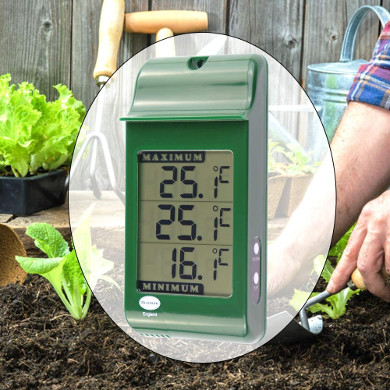
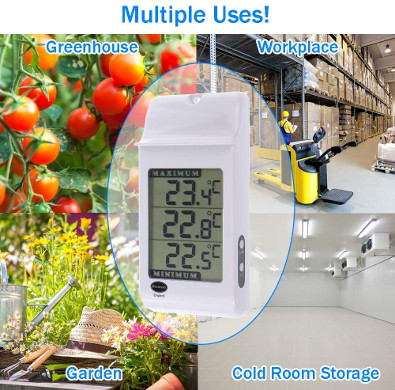
The ETI digital max/min thermometer is listed as white model 810-110 and green model 810-111. The current product page specifies a measuring range of −20 to 59.9°C, 0.1°C resolution, ±1°C accuracy and one AAA battery. Resolution is the display increment; it does not mean accuracy of one tenth of a degree.
The manufacturer’s 810-110/111 instructions identify the CLEAR button as the way to reset the extremes. Our historical listing used different dimensions, a narrower range and an AA battery. Check the model label and supplied instructions if you own an older unit; do not apply the current specification to it automatically.
A US example for remote monitoring
La Crosse’s US Temp Tracker Advanced X100-TM02-03 combines a Bridge gateway with two LTV-TH2 temperature/humidity sensors and an interior sensor. Remote viewing and alerts use the La Crosse View app and an internet-connected gateway; the gateway needs 2.4GHz Wi-Fi. Use the weather-resistant LTV-TH2 in the appropriate sheltered position, following its instructions, rather than assuming the interior sensor is suitable for a damp greenhouse.
This is a US-market example, not a verified UK substitute. Before buying any connected monitor, test the route from sensor to gateway and from gateway to phone. Arrange someone who can respond to an alert; a notification alone cannot protect plants.
Use the readings to guide action
Cold nights: use the minimum to check whether your protection is adequate for the plants you actually grow. Their minimum requirements differ. Allow for instrument uncertainty and temperature variation around the greenhouse when setting an alert; waiting for a displayed 0°C is not a universal frost-protection plan.
Hot days: the RHS ventilation and shading guidance warns of possible plant damage as temperatures build above about 27°C. Treat that as a reason to act, not an ideal temperature for every crop. Compare the maximum before and after changing ventilation or shade. Our greenhouse window-opener guide explains fit and adjustment; wax-operated openers respond gradually and may need supplementary ventilation.
If readings look implausible, first check position, battery and the recording period. Comparing two instruments side by side after they have settled can reveal disagreement, but does not establish which is correct. For a critical threshold, ask the supplier about an appropriate calibration check. Do not immerse a non-waterproof unit in ice water.
Keep watering under separate review during hot weather: our automatic watering guide covers delivery to the root zone. Product links here are clean, non-affiliate manufacturer links. Confirm the exact model, current availability and environmental suitability before ordering.