Bird-Box Cameras: Choosing and Installing a Wildlife-Friendly Setup
First published in 2015. Substantially updated in October 2026 using manufacturer, conservation and security guidance. Garden Gadget Zone has not physically tested the cameras described.
A bird-box camera can show nesting behaviour without repeatedly opening the box. The useful purchase is a complete setup that fits the box, has dependable power and a workable route for the pictures. A camera labelled “wireless” may still need a cable to a mains power supply.
Choose the nest site for the birds first, then decide whether a camera can be installed without compromising it. Fit, focus and test equipment while the box is unoccupied, well before nesting begins. Once birds are using it, obtaining a better picture is not a reason to disturb them.
Decide what you want to watch
An internal nest-box camera needs to focus at short range in a confined, dim space. A feeder camera looks out across an open scene and needs appropriate weather protection and a different field of view. A general outdoor security camera may be too large, focus too far away or require lighting unsuitable for the box. These are different jobs.
Measure the available mounting space, distance to the expected nest floor, and clearance below the roof. Allow for nesting material changing the viewing distance. A wide-angle lens can cover more of the interior, but its specification alone does not prove that it will focus correctly in your box. Ask to see the recommended box dimensions and mounting instructions.
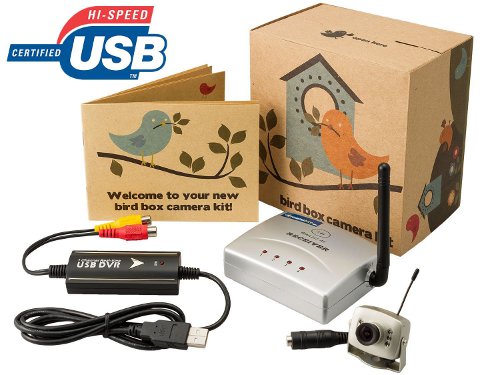
Wired, Wi-Fi and battery systems
- Wired video: carries the picture over a cable to a receiver, recorder or network device. Confirm the complete connection chain; an old analogue camera does not connect directly to every modern television or phone.
- Wi-Fi camera: connects through a compatible wireless network. It usually still needs power at the box, and reliable signal where the camera is mounted.
- Battery camera: avoids a continuous external power lead, but charging intervals and recording behaviour matter. A motion-triggered feeder camera is not automatically suitable for continuous viewing inside a nest box.
- Solar-assisted equipment: still depends on its battery and available charging conditions. Do not assume an unrelated solar panel can safely power a camera.
Make a simple plan showing the camera, its power supply, the router or receiver, and the viewing device. Check every required cable, connector and optional accessory before ordering. A “camera only” price may exclude the box, memory card, extension lead and weatherproof connection arrangements.
A current example, with generation-specific checks
The UK Green Feathers Wi-Fi bird-box camera, listed as GFWF3GB-B01 at our check, provides a useful example of what to verify. Its current listing specifies 1080p video, 12V DC power and support for a microSD card up to 128GB; the card is not included. Select the appropriate UK power-supply option rather than assuming every regional package is identical.
The manufacturer says units bought after October 2024 support both 2.4GHz and 5GHz Wi-Fi. Earlier units and older instructions may differ, so check the exact generation when buying second-hand or following an online setup guide. It also describes the camera as not waterproof despite a stated IP54 rating: the listing does not justify exposing it directly to rain.
Use the manufacturer’s GFWF3 support guide to confirm the app, pairing procedure and current instructions. App compatibility, recording options and any cloud-service charges should be checked for the phone and generation you will use. These details are more useful than treating “HD” or “wireless” as a complete specification.
Test the whole setup indoors first
- Confirm the components. Match the model number to its manual and use the specified power equipment. Do not substitute a supply because its plug fits.
- Set up the connection. Pair or connect the camera, apply supported updates, and confirm that all intended viewers can use the authorised sharing method.
- Check focus and coverage. Use the intended box or a measured equivalent while it is empty. Test the expected nesting area, not a distant object across the room.
- Test recording and playback. Verify that a clip is actually saved, can be retrieved and has a sensible timestamp. Live viewing alone does not establish that recording works.
- Test at the intended location before final mounting. A strong signal next to the router does not establish coverage through an exterior wall and a wooden box.
Do these checks before the box becomes occupied. If a connection proves unreliable later, accept lost pictures rather than repeatedly approaching or opening an active nest to troubleshoot.
Installation should protect the nest and the equipment
Choose a species-appropriate box and position using the RSPB’s nest-box guidance. Camera convenience should not determine the entrance size or expose the box to unsuitable conditions. Secure the camera and route cables so birds cannot become caught in loose loops or reach sharp fixings. Keep the entrance and ventilation clear.
Plan access before using ladders or mounting equipment high up. Follow the manufacturer’s instructions for cable entry, strain relief and weather protection, and keep mains equipment in its permitted location. A low-voltage lead at the camera does not make the upstream mains supply weatherproof. Use a qualified electrician where outdoor mains provision is needed.
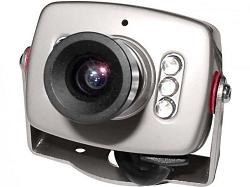
Do not enlarge a nest-box opening simply to improve the image or add a visible lamp to brighten the interior. Infrared capability describes how a camera sees in low light; it does not prove that every installation is disturbance-free. Keep decorative garden lighting away from the nest site and preserve darkness around it.
Active nests: observation has limits
The government’s wild-bird protection guidance for England explains protection for wild birds, eggs and nests, including nests in use or being built. Some species have additional protection against disturbance. Check the relevant national guidance if you are elsewhere in the UK; camera ownership does not create an exemption.
Leave an active nest alone. Do not move it, handle eggs or chicks, or open the box to adjust focus, clean a lens or restore a failed connection. A quiet interval on the screen does not prove abandonment. If you are concerned about welfare, seek advice from an appropriate wildlife organisation rather than intervening for the sake of the footage.
Explain to children watching the stream that nesting can include failed eggs, predation and chick deaths. The camera records wildlife rather than guaranteeing a successful brood. Keep people and pets away from the nest site even if everybody is interested in the live pictures.
Recording, storage and security
Choose between occasional live viewing, event clips and continuous recording according to the product’s actual capabilities. Storage duration varies with resolution, compression, frame rate and recording mode; a card’s capacity alone does not establish a number of days. Check whether old recordings are overwritten automatically and export anything you want to keep.
A local memory card can reduce dependence on paid cloud storage, but does not necessarily remove account or internet requirements. Ask what works during an internet outage, what remains accessible if a subscription ends, and how long the manufacturer supports the app and firmware. Do not assume a current phone app will remain available indefinitely.
The NCSC’s smart-camera guidance recommends measures including secure passwords, software updates and disabling unnecessary remote access. Use unique account credentials and additional account protection where offered. Share access through supported controls rather than posting a login or an unrestricted stream link.
Frame outdoor views to avoid neighbours’ private spaces, and consider whether audio capture is needed. Review who can see or download recordings. Before passing a camera to someone else, follow the manufacturer’s account-removal and reset procedure and deal with any memory card separately.
Maintenance without disturbing occupants
Plan physical inspection and cleaning for an appropriate period after nesting, checking that the box is no longer occupied. The RSPB recommends autumn cleaning and warns that some birds can still be nesting in September. Rules on removing unhatched eggs differ by location and season; follow its current guidance rather than assuming all contents can be discarded whenever the camera appears quiet.
Remove or protect electronics according to their instructions before cleaning the box. The RSPB’s boiling-water method is for the nest box, not the camera, cables or power supply. Let the box dry thoroughly, inspect fixings and refit equipment only when appropriate. Do not use insecticides in the box.
Before the next season, check the lens, cable condition, recording media, app access and clock. A short test while the box is empty is much less intrusive than a repair attempt after nesting has started.
What changed from the older camera recommendation
This page previously centred on a SpyCameraCCTV analogue kit and historic UK/US Amazon destinations. Its claims about TV-line resolution, transmission range, computer adapters and battery operation belonged to that old listing. They should not be assumed to describe a current Wi-Fi camera or a second-hand kit with missing parts.
For a new purchase, budget for the complete installation and supported recording method. For older equipment, identify the exact camera and receiver before buying adapters. Above all, choose a setup you can finish and leave undisturbed before birds begin using the box.